Categories
Gadget Gadgets News

Everything You Need to Know About the iPhone 16e

iPhone 16e

Apple has launched the iPhone 16e, a thoughtfully designed addition to its lineup that combines affordability with modern functionality. Positioned as an entry-level option, the iPhone 16e offers a minimalist aesthetic, advanced AI capabilities, and dependable hardware. At a starting price of $599, it caters to users who seek essential features without straining their budget. While it incorporates strategic compromises to differentiate itself from premium models, the device remains a strong contender for those prioritizing practicality and value. The video below from Nikias Molina gives us a look at the new iPhone 16e and its range of features.

Design and Build: Simplicity with Purpose

The iPhone 16e embraces a clean, minimalist design that prioritizes functionality. Its textured glass back enhances both grip and durability, making sure the device feels secure during everyday use. Available in two understated colors—white and black—it opts for a sleek, professional look rather than the vibrant hues seen in other models. This design choice reflects its focus on practicality and simplicity.

However, the absence of MagSafe compatibility is a notable limitation. Users accustomed to the convenience of magnetic accessories, such as chargers and cases, may find this omission disappointing. Despite this, the iPhone 16e’s design remains well-suited for users who value durability and straightforward usability over accessory integration.

Camera: Focused on Essentials

The iPhone 16e is equipped with a single 48MP camera that includes 2x optical zoom, delivering sharp and reliable image quality for everyday photography. This setup is ideal for users who prioritize simplicity and ease of use. The camera excels in capturing clear, detailed photos in a variety of lighting conditions, making it a dependable choice for casual photographers.

However, the device lacks advanced features such as ultrawide, macro, cinematic, and action modes, which are standard in higher-end models. These omissions may deter photography enthusiasts seeking greater creative flexibility. For users who primarily need a reliable camera for basic photography, the iPhone 16e offers a straightforward and effective solution.

Hardware: Performance Meets Efficiency

At the heart of the iPhone 16e is the powerful A18 chip, the same processor found in the iPhone 16 Pro. This ensures smooth performance across a range of applications, from multitasking to gaming. The device also debuts Apple’s first in-house modem, the Apple C1, which enhances connectivity and boosts battery efficiency. These advancements contribute to a seamless and responsive user experience.

One of the standout features of the iPhone 16e is its impressive battery life. With over 26 hours of video playback, the device is well-suited for users who need long-lasting performance throughout the day. This combination of robust hardware and energy efficiency makes the iPhone 16e a reliable choice for those who value consistent performance and extended usage.

Software and AI: Smarter Features for Everyday Use

The iPhone 16e introduces Apple Intelligence, a suite of AI-driven tools designed to enhance usability and productivity. These features aim to simplify everyday tasks and provide a more personalized user experience. Key highlights include:

  • Visual Intelligence: Advanced object recognition, real-time translation, and contextual search capabilities that streamline information retrieval and interaction.
  • ChatGPT Integration: Siri now uses ChatGPT to deliver more nuanced responses and offer enhanced productivity tools, making it a more versatile virtual assistant.
  • Image Playground: A creative app for photo editing and design, catering to casual creators and hobbyists looking to explore their artistic side.

Additionally, the customizable Action Button provides quick access to frequently used functions, such as launching the camera or allowing silent mode. These software enhancements are particularly appealing to users who value AI-driven tools and personalization, making the iPhone 16e a smart and adaptable device for everyday use.

Connectivity and Charging: USB-C Takes Center Stage

In line with Apple’s transition to universal standards, the iPhone 16e features USB-C for charging and data transfer. This shift aligns with broader industry trends, offering faster and more efficient connectivity. While the device supports wireless charging, the lack of MagSafe compatibility limits its integration with magnetic accessories. Users may need to adjust their existing setups to accommodate this change.

Despite this limitation, the adoption of USB-C represents a step toward greater compatibility and convenience. For users who prioritize standardized connectivity, the iPhone 16e provides a practical solution that aligns with modern technological trends.

Pricing and Target Audience

With a starting price of $599, the iPhone 16e is positioned as a budget-friendly alternative to Apple’s higher-end models. It is designed for users who value essential features, strong battery life, and advanced AI tools without the need for premium extras. The device appeals to a wide audience, including students, professionals, and casual users seeking a reliable smartphone at an accessible price point.

However, its limited camera capabilities and lack of MagSafe compatibility may deter those who prioritize advanced photography features or seamless accessory integration. For users who can overlook these compromises, the iPhone 16e offers a balanced combination of affordability and functionality.

A Balanced Entry-Level Option

The iPhone 16e strikes a thoughtful balance between cost-effectiveness and modern features. Its minimalist design, robust hardware, and AI-driven tools make it a compelling choice for budget-conscious users who prioritize practicality over premium extras. While the device’s compromises in camera versatility and accessory compatibility highlight its entry-level positioning, it delivers a reliable and efficient experience for everyday use. For those seeking a smartphone that blends affordability with essential functionality, the iPhone 16e stands out as a well-rounded option.

Check out more relevant guides from our extensive collection on iPhone 16e that you might find useful.

Source & Image Credit: Nikias Molina

Filed Under: Gadgets News

Latest Geeky Gadgets Deals

Disclosure: Some of our articles include affiliate links. If you buy something through one of these links, Geeky Gadgets may earn an affiliate commission. Learn about our Disclosure Policy.
Categories
Apple How To iphone Mobile News Privacy Protect Your Devices Quick Tips Safety Security

How to update your passcode on your iPhone

Have you ever stopped and thought, “Is my iPhone as secure as it could be?” Maybe your current passcode is a bit too easy to guess. The good news is that changing your iPhone’s passcode to something more robust is not only possible but pretty straightforward.  Here are some easy steps to give your iPhone an extra layer of security.


MORE: BEST ACCESSORIES FOR YOUR PHONE 


How to change the passcode on your iPhone

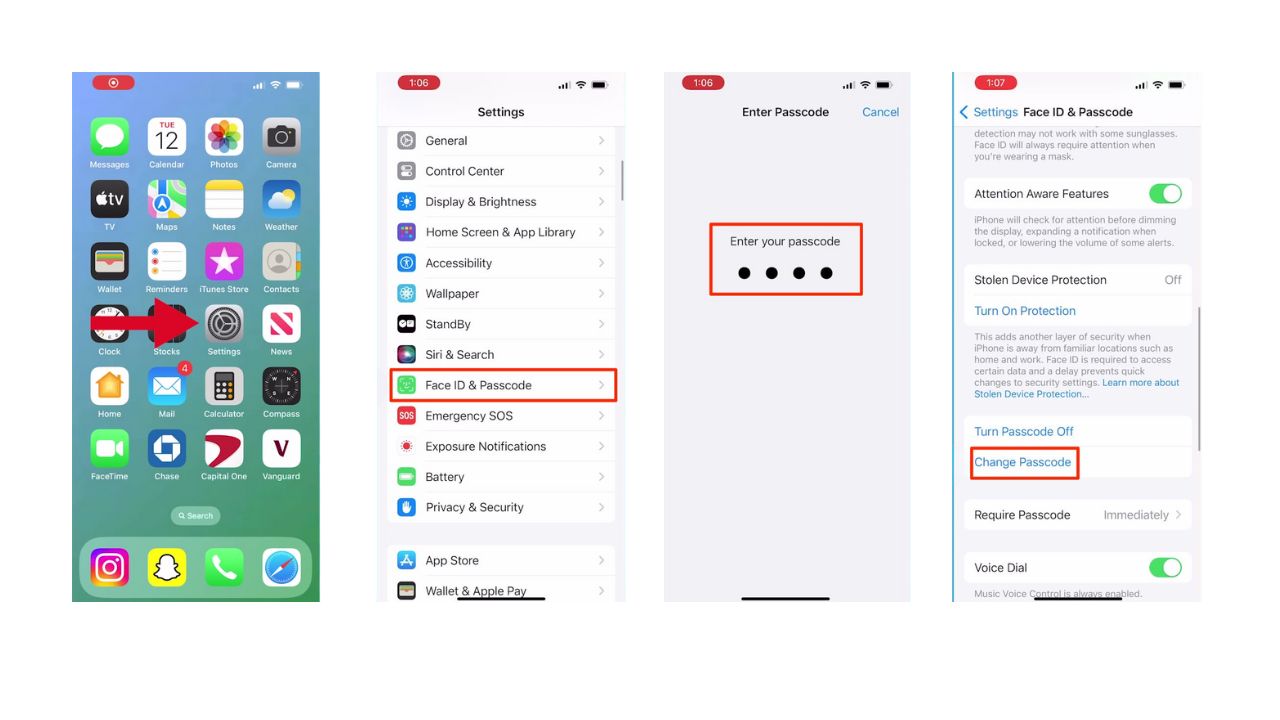
  • Open the Settings app
  • Then scroll down until you find Face ID & Passcode and tap it
  • When prompted, type in your current passcode
  • Then scroll down to Change Passcode and click on it

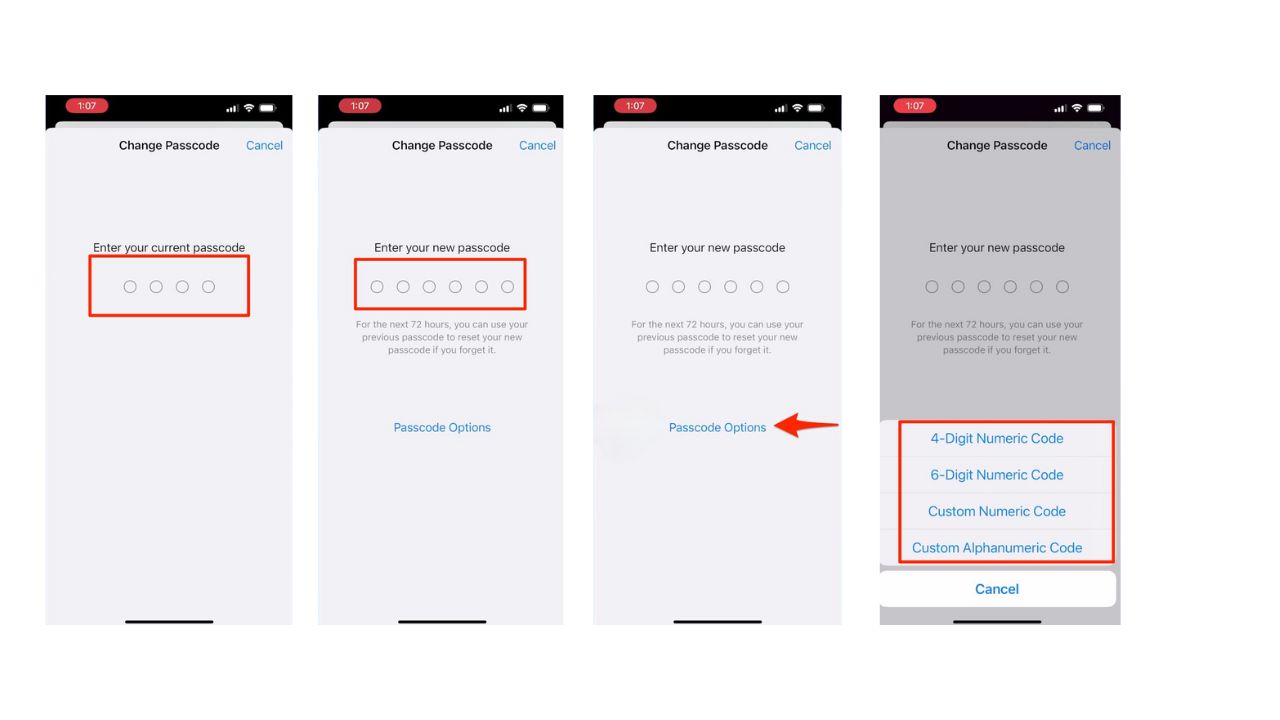
  • Type in your current passcode
  • Then, you’ll be prompted to type in a new passcode
  • Before you do this step, there’s an advanced option at the bottom of the screen called “passcode options” that will allow you to choose from:
  • 4-digit numeric Code
  • 6-digit numeric Code
  • Custom numeric Code
  • Custom Alphanumeric Code

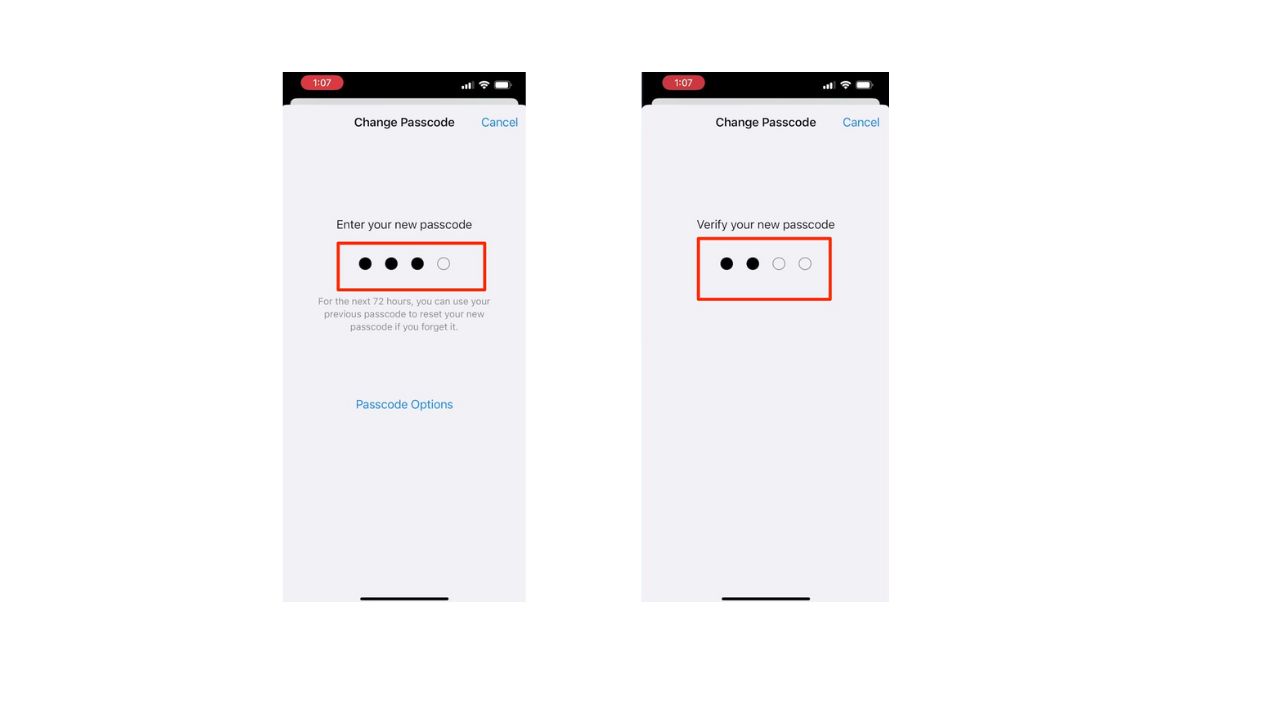
  • Once you choose what you want your passcode to be, type in your new passcode
  • To verify, type in your new passcode again

Remember, the longer and more complex your passcode, the tougher it is for prying eyes to sneak a peek as you type it in.  Also, consider investing in a privacy screen. These screen protectors limit the viewing angle of your display, making it difficult for anyone besides you to see what’s on your screen. This adds an extra layer of security, especially when you’re in public.


MORE: TOP AFFORDABLE CELL PHONE PLANS  


Use strong and unique passwords

While a strong passcode and privacy screen are great first steps, there’s more you can do to secure your iPhone. What about those complex passwords you created? Remembering them all can be a nightmare.  This is where password managers come in. Password managers take the burden off you. These apps generate strong, unique passwords for all your accounts and store them securely.  It will help you to create unique and difficult-to-crack passwords that a hacker could never guess. Second, it also keeps track of all your passwords in one place and fills passwords in for you when you’re logging into an account so that you never have to remember them yourself.  The fewer passwords you remember, the less likely you will be to reuse them for your accounts.

One of the best password managers out there is NordPass. NordPass is a secure and user-friendly password manager that uses zero-knowledge and military-grade XChaCha20 encryption to protect your data. It supports Windows, macOS, Linux, Android, iOS, and major browsers while offering unlimited password storage, secure sharing, password health reports, data breach monitoring, auto-fill, and emergency access. 

CyberGuy Exclusive NordPass Deal: Save 56% and get 3 extra months FREE with a 2-year plan. Try 30 days risk-free for only $1.29/month!

Get more details about my best expert-reviewed Password Managers here.


MORE: 8 WAYS TO LOCK UP YOUR PRIVATE STUFF ON YOUR IPHONE


Kurt’s key takeaways

With a stronger passcode and some extra tricks like a privacy screen, your iPhone can be a fortress of security. Don’t forget to check out the password manager recommendations too – remembering strong, unique passwords for everything is a pain, but these apps can do the heavy lifting for you.

Beyond passcodes and passwords, what do you consider the biggest security risks for your iPhone? Let us know in the comments below.

FOR MORE OF MY TIPS, SUBSCRIBE TO MY FREE CYBERGUY REPORT NEWSLETTER HERE


Copyright 2025 CyberGuy.com.  All rights reserved.  CyberGuy.com articles and content may contain affiliate links that earn a commission when purchases are made.

Categories
Gadget Gadgets News

iPhone 16e Buyer’s Guide: Specs Features & Price

iPhone 16e

The iPhone 16 lineup introduces a variety of devices designed to meet the diverse needs of users, with the iPhone 16e standing out as the most affordable option. While it delivers reliable performance and noteworthy battery life, it lacks some of the advanced features found in the higher-end models. The video below from GregsGadgets provides an in-depth look at the key specifications, features, and pricing to help you make an informed decision.

Design & Build

The iPhone 16e features a 6.1-inch display, an aluminum frame, and a glass back, offering a lightweight yet durable design. These characteristics align it closely with the standard iPhone 16. However, the Pro models distinguish themselves with a titanium build, which not only enhances durability but also provides a more premium aesthetic, albeit at the cost of increased weight.

For users who prefer larger screens, the lineup includes the 6.3-inch iPhone 16 Pro and the 6.9-inch iPhone 16 Pro Max, catering to those who prioritize screen real estate for media consumption or productivity.

Display

The iPhone 16 lineup employs OLED technology across all models, but the quality and features of the displays vary significantly:

  • iPhone 16e: Equipped with a standard OLED display offering a peak brightness of 800 nits, making it suitable for most lighting conditions.
  • Higher-end models: Deliver up to 2,000 nits of peak brightness, making sure better visibility in bright environments such as direct sunlight.
  • Pro models: Feature a 120Hz ProMotion display with always-on functionality, providing smoother visuals and enhanced HDR performance for a more immersive experience.

One notable omission in the iPhone 16e is the Dynamic Island, a feature that is standard on the other models. This absence may be a consideration for users who value the added functionality and interactivity that Dynamic Island provides.

Performance

The iPhone 16 lineup is powered by the A18 chip and includes 8GB of RAM, making sure fast and efficient performance across all models. However, the GPU capabilities differ, impacting graphics performance:

  • iPhone 16e: Features a 4-core GPU, which is sufficient for everyday tasks and moderate gaming.
  • iPhone 16/16 Plus: Upgraded with a 5-core GPU, offering improved graphics performance for more demanding applications.
  • Pro/Pro Max: Equipped with a 6-core GPU, optimized for gaming, video editing, and other graphics-intensive tasks.

The A18 chip ensures long-term software support, making the iPhone 16 lineup a future-proof investment for users who prioritize longevity and performance.

Battery Life

The iPhone 16e excels in battery life among the non-Plus and non-Pro Max models, thanks to its efficient C1 modem and optimized battery capacity. This makes it an excellent choice for users who prioritize all-day usage without frequent recharging.

For those seeking maximum battery life, the iPhone 16 Pro Max is the standout option, offering a larger battery capacity due to its increased size. This makes it ideal for power users who rely heavily on their devices throughout the day.

Camera System

The camera capabilities across the iPhone 16 lineup vary significantly, catering to different levels of photography and videography needs:

  • iPhone 16e: Features a single 48MP camera with 2x zoom, suitable for everyday photography. However, it lacks advanced features such as ultra-wide, macro, and cinematic modes.
  • iPhone 16: Adds a second ultra-wide camera and improved stabilization, offering greater versatility for capturing a variety of scenes.
  • Pro/Pro Max: Boast a triple-camera system, including a 5x telephoto lens, ProRAW/ProRes capabilities, and superior video recording options, making them ideal for professionals and photography enthusiasts.

While the iPhone 16e provides a capable camera for casual users, those who require more advanced features for creative or professional purposes may find the Pro models more appealing.

Connectivity & Features

The iPhone 16e is positioned as a more basic option, omitting several premium features found in the higher-end models:

  • Does not support MagSafe, Wi-Fi 7, Thread technology, or the ultra-wideband chip.
  • Includes a USB-C port but is limited to USB 2.0 speeds, compared to the faster 10Gbps transfer rates available on Pro models.

These omissions make the iPhone 16e a practical choice for users who do not require advanced connectivity options or premium features, focusing instead on core functionality.

Pricing & Storage Options

The iPhone 16 lineup offers a range of pricing and storage configurations to suit different budgets and needs:

  • iPhone 16e: Starts at $600 for the 128GB model, with upgrades to 256GB and 512GB available for $100 and $300 more, respectively.
  • iPhone 16: Priced at $800, with the Plus model costing $100 more.
  • Pro/Pro Max: Positioned as premium devices, starting at $1,000 for the Pro and $1,200 for the Pro Max, with storage options reaching up to 1TB.

The iPhone 16e’s competitive pricing makes it an attractive option for budget-conscious users, while the higher-end models cater to those willing to invest in advanced features and premium materials.

Target Audience

Each model in the iPhone 16 lineup is tailored to specific user needs, making sure there is an option for everyone:

  • iPhone 16e: Ideal for budget-conscious users who prioritize strong performance, excellent battery life, and essential features.
  • iPhone 16/16 Plus: Suited for those seeking additional features such as Dynamic Island, MagSafe compatibility, and enhanced camera systems.
  • Pro/Pro Max: Designed for enthusiasts, professionals, and users who value advanced cameras, high-quality displays, and premium materials.

By understanding your specific requirements and preferences, you can select the model that best aligns with your lifestyle and usage patterns.

Comparison with iPhone 15

The iPhone 15, still available at $700, offers an older chip, less RAM, and inferior battery life compared to the iPhone 16e. These differences make the iPhone 16e a more compelling choice for users seeking a future-proof device with improved performance and longevity. The advancements in the iPhone 16 lineup highlight its value as a worthwhile upgrade over its predecessor.

Here are additional guides from our expansive article library that you may find useful on iPhone 16e.

Source & Image Credit: GregsGadgets

Filed Under: Gadgets News

Latest Geeky Gadgets Deals

Disclosure: Some of our articles include affiliate links. If you buy something through one of these links, Geeky Gadgets may earn an affiliate commission. Learn about our Disclosure Policy.
Categories
Gadget Gadgets News

10 Tips and Tricks for Mastering the iPhone Mail App

iPhone Mail App

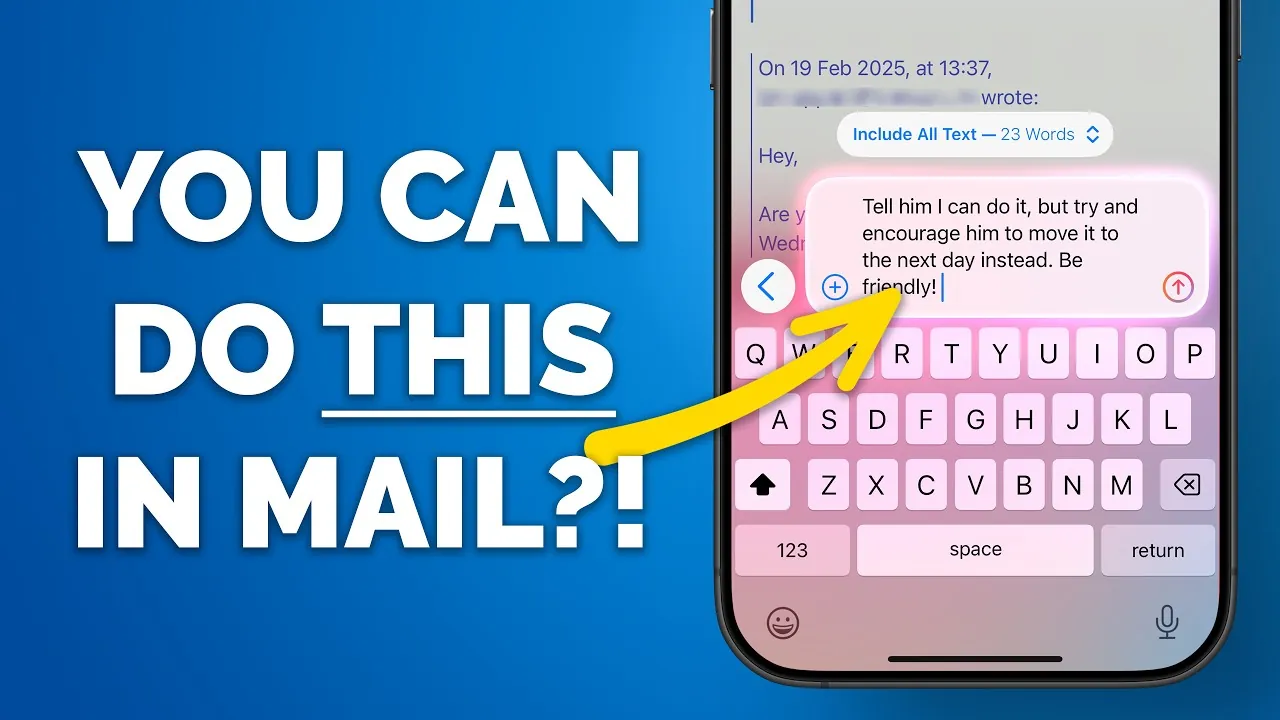
The iPhone Mail app is a versatile and powerful tool for managing your emails effectively. With its advanced features, supported by Apple Intelligence, it enables you to streamline your inbox, enhance productivity, and tailor your email experience to your specific needs. By using these features, you can take full control of your email management and make the most of this essential app. In the video below, Proper Honest Tech shows us ten practical tips and tricks to help you unlock its full potential.

1. Organize Emails with Automatic Categorization

The Mail app’s automatic categorization feature is designed to simplify email organization. It automatically sorts your emails into predefined categories such as Primary, Transactions, Updates, and Promotions. This feature helps you focus on important messages while keeping less critical emails neatly organized. You can toggle between the categorized view and the traditional list view, depending on your preference. Additionally, for greater control, you can manually reassign emails to different categories, making sure your workflow remains efficient and personalized.

2. Customize Badge Notifications

Badge notifications can be customized to display only the information that matters most to you. For instance, you can choose to see the count of unread emails across all categories or limit notifications to just the Primary inbox. This customization reduces distractions, allowing you to concentrate on high-priority messages without being overwhelmed by less urgent updates. Adjusting these settings ensures that your notifications align with your priorities.

3. Simplify Conversations with Group by Sender

The “Group by Sender” feature consolidates all emails from a single sender into one thread, making it easier to track conversations and locate specific messages. This feature is particularly useful for managing ongoing discussions or frequent correspondences. If you prefer to view emails individually, you can disable this feature for specific threads, offering flexibility to adapt the app to your communication style. Streamlining conversations in this way can save time and reduce clutter in your inbox.

4. Correct Mistakes with Undo Send Delay

The Undo Send Delay feature provides a safety net for email errors. By setting a delay of 10, 20, or 30 seconds, you gain a brief window to cancel or edit an email before it is sent. This feature is invaluable for catching typos, revising your message, or rethinking your response before it reaches the recipient. It’s a simple yet effective tool for making sure your emails are polished and accurate.

5. Streamline Scheduling with Calendar Integration

The Mail app integrates seamlessly with the Calendar app, allowing you to create events directly from email content. For example, if an email contains a meeting date or event details, you can add it to your calendar with a single tap. Additionally, linked emails can be accessed directly from calendar events, making sure you have all relevant information readily available. This integration simplifies scheduling and keeps your plans organized without switching between apps.

6. Turn Emails into Tasks with Reminders Integration

With Reminders integration, you can transform emails into actionable tasks. This feature allows you to create reminders from email content or link entire emails to reminders for easy follow-up. Whether you use Siri voice commands or drag-and-drop functionality, this integration ensures you stay on top of your responsibilities. By turning emails into tasks, you can manage deadlines effectively and never miss an important follow-up.

7. Stay on Track with Follow-Up Suggestions

The Follow-Up Suggestions feature uses Apple Intelligence to remind you about emails that haven’t received a reply. This automated prompt helps you stay on top of your communications, making sure no important message is overlooked. If you find this feature unnecessary, it can be easily disabled in the app’s settings. Staying proactive with follow-up suggestions can improve your responsiveness and communication efficiency.

8. Save Key Emails with Notes Integration

For users who frequently rely on the Notes app, the Mail app offers a convenient integration. You can drag and drop emails into Notes as hyperlinks, allowing you to reference important messages while brainstorming or working on related projects. This feature keeps your ideas and information connected in one place, making it easier to organize your thoughts and collaborate effectively.

9. Use Apple Intelligence for Smarter Email Management

Apple Intelligence enhances the Mail app with features like inbox-level email summaries, which provide quick previews of message content. You can also pin priority emails at the top of your inbox for better visibility. These tools help you manage your inbox more efficiently. Additionally, ChatGPT integration allows you to draft email replies using customizable prompts, saving time and streamlining communication. These intelligent features make the Mail app a powerful tool for both personal and professional use.

10. Personalize Your Experience with Customization Options

The Mail app offers a variety of customization options to suit your preferences. You can adjust email summaries, prioritize specific messages, and enable or disable features to create a setup that works best for you. These options ensure the app adapts to your needs, providing a personalized email management experience. By tailoring the app to your workflow, you can maximize its functionality and efficiency.

Summary

By applying these ten tips and tricks, you can transform the iPhone Mail app into a powerful productivity tool. From automatic email categorization to seamless integrations with Calendar, Reminders, and Notes, the app is designed to simplify your email management. With advanced features like Follow-Up Suggestions and ChatGPT-assisted drafting, the Mail app enables you to stay organized, save time, and communicate more effectively. Explore these features today to take full control of your inbox and enhance your email experience.

Explore further guides and articles from our vast library that you may find relevant to your interests in iPhone Mail App Tips.

Source & Image Credit: Proper Honest Tech

Filed Under: Gadgets News

Latest Geeky Gadgets Deals

Disclosure: Some of our articles include affiliate links. If you buy something through one of these links, Geeky Gadgets may earn an affiliate commission. Learn about our Disclosure Policy.

Categories
Apple iphone News

Does the iPhone 16e Have MagSafe Support?

Magsafe is one of the most useful and cool way to charge an iPhone. Ever since Apple introduced MagSafe, many users have loved it, especially because of the various accessories that make life easier. But does the new iPhone 16e support MagSafe charging? Let’s find out

Apple has finally launched the affordable iPhone 16e (expected as iPhone SE 4), which is the successor to the iPhone SE 2022. With the release of iPhone 16e, the iPhone SE lineup concludes. However, aside from the name change, everything else remains the same. It is affordable, packs the latest features including Apple Intelligence, and is available at a lower price than the number series models.

Does iPhone 16e support MagSafe?

No. While everything is at par with flagship models, the iPhone 16e does not support MagSafe charging. This means you cannot use those amazing MagSafe accessories with the newly launched iPhone 16e.

The iPhone 16e still supports 7.5W Qi wireless charging, but it lacks MagSafe support. It’s not surprising that the iPhone 16e doesn’t support MagSafe since it’s essentially the successor of the iPhone SE, which also didn’t have MagSafe charging. However, since now it has number series naming, many expected it to include MagSafe.

If you’re considering using MagSafe cases and wallets with the new iPhone 16e, you’ll be let down. Who will not be disappointed, after all, MagSafe is a convenient and safe way to charge iPhone wirelessly.

does iPhone 16e support MagSafedoes iPhone 16e support MagSafe

The iPhone 16e features the Type C port instead of the Lightning port found in the last generation iPhone SE. As usual Apple hasn’t shared the actual charging rate support. Nevertheless, they mentioned that the device can be charged to 50% in just 30 minutes.

The new iPhone 16e is priced at $599, while the vanilla iPhone 16 costs $799. If you’re planning to use various MagSafe accessories, it might be a good decision to invest in the iPhone 16, as it offers additional features such as improved camera setup.

There are options like a Case or a magnetic ring to attach MagSafe accessories with a non-compatible device. But it can not charge the device faster and have some other limitations, they still provide the option to use MagSafe accessories.

While MagSafe support might not be a big of concern for most users, it could be a dealbreaker for some, especially those who already own MagSafe accessories. We’d love to hear your thoughts on this matter. Is it a deal breaker for you?

Images: Apple

Also Check:

Categories
Apple iphone News

Does iPhone 16e have 120Hz Refresh Rate Display?

Apple’s cheapest new iPhone is here! The iPhone 16e is now the newest member of the iPhone 16 family. This Apple smartphone is for those who want the goodness of iOS but don’t want to spend too much on a new iPhone.

The new iPhone 16e now comes with a full-screen display and also the old-style notch that is present at the top of the screen. But the big question now is, if the new iPhone 16e comes with a 120 Hertz Refresh Rate screen or not. Let’s take a look.

Does the iPhone 16e Come With A 120 Hertz Refresh Rate Screen?

Nope, the new iPhone 16e that has just been launched by Apple doesn’t come with the high refresh rate 120-hertz screen. Instead, it follows the same screen from the base mode iPhone 15 and iPhone 15 Plus.

That means you get the basic 60 Hertz refresh rate screen. This is expected since Apple doesn’t provide the high refresh rate screen on the base models of the iPhone 14, 15, and 16 series. 

Only the Pro models of the iPhone 14,15 and 16 series get the high refresh rate screen. While you get a basic 60-hertz screen on the iPhone 16e, you get other good upgrades internally such as the A18 Bionic chip, and the new Apple C1 modem, and on the software side of things, you get access to Apple’s suite of AI tools – Apple intelligence.

The simple reason to avoid the high refresh rate screen for the iPhone 16e is to keep the cost of the device low. Additionally, it would not make sense to keep a high refresh rate screen for the iPhone 16e when the base models of the iPhone 16 still rock the 60-hertz displays.

The iPhone 16e is for…..?

The iPhone 16 is a great device for the senior members of the family who need to use FaceTime and iMessage to keep in touch with other family members, as they might also be using iPhones. If you just want an iOS device that does all your basic tasks and takes decent photos, the iPhone 16e is for you.

If you do not want to spend more for an iPhone but also do not want the iPhone 16e because it lacks the cameras and high refresh rate displays, your best bet is to look for offers and deals on the older iPhone models or look for the newer iPhones models on the second-hand market.

What holds for future SE or e-Series models? Well, until Apple brings the high refresh rate displays to the base models, do not expect the budget models of the iPhone to rock these high-end refresh rate displays.

Explore More:

Categories
Gadget Gadgets News

iPhone 16e vs. iPhone 14: A Detailed Comparison

iPhone 16e vs. iPhone 14

The iPhone 16e emerges as a successor to both the iPhone 14 and the iPhone SE (3rd generation), blending notable upgrades with a few compromises. For anyone considering an upgrade, understanding the distinctions between these models is crucial. This comparison video from Matt Talks Tech highlights the key features of the iPhone 16e and iPhone 14, helping you determine which device aligns best with your preferences and needs.

Display: Familiar Yet Reliable

Both the iPhone 16e and iPhone 14 feature a 6.1-inch OLED Super Retina XDR display with a resolution of 2532 x 1170, offering sharp visuals at 460 pixels per inch (PPI). The HDR brightness peaks at 1,200 nits, making sure vivid colors and excellent contrast for media consumption and everyday use. However, neither model includes the Dynamic Island feature, retaining the traditional notch design. The refresh rate remains at 60Hz, which, while functional, feels dated compared to higher-end models that offer smoother scrolling and animations. For users who prioritize a consistent and reliable display, both devices deliver a comparable experience.

Performance: A Leap Forward

The iPhone 16e introduces the A18 chip, a significant upgrade from the A15 Bionic chip found in the iPhone 14. With its 6-core CPU and 4-core GPU, the A18 ensures faster processing speeds and enhanced graphics performance, making it ideal for demanding tasks such as gaming, video editing, and multitasking. Additionally, the iPhone 16e comes equipped with 8GB of RAM, compared to the 6GB in the iPhone 14. This increase in memory allows for smoother app transitions and improved performance when running multiple applications simultaneously. For users seeking a device capable of handling intensive workloads, the iPhone 16e offers a clear advantage.

Battery Life: Efficiency Redefined

Both models house a 3,279mAh battery, but the iPhone 16e uses its A18 chip and the new C1 coprocessor to deliver superior battery efficiency. The iPhone 16e offers up to 26 hours of video playback, compared to the 20 hours provided by the iPhone 14. This improvement translates to longer usage times between charges, making the iPhone 16e a better choice for users who rely heavily on their devices throughout the day. Whether you’re streaming, gaming, or working on the go, the iPhone 16e ensures extended performance without frequent recharging.

Charging and Ports: A Shift to USB-C

The iPhone 16e introduces a USB-C port, replacing the Lightning port found on the iPhone 14. This change aligns with industry trends and offers faster data transfer speeds and broader compatibility with accessories. Both models support 27W wired charging and 15W wireless charging, making sure quick and convenient power-ups. However, the iPhone 16e does not support MagSafe, a feature available on the iPhone 14. For users who rely on MagSafe accessories, such as magnetic chargers or wallets, this omission could be a deciding factor. The shift to USB-C, however, positions the iPhone 16e as a more future-proof option for connectivity.

Camera: Simplicity vs. Versatility

The iPhone 16e features a single 48MP wide camera, delivering improved detail and 2x zoom capabilities. This setup excels in capturing sharp, high-resolution images, making it a strong contender for photography enthusiasts. In contrast, the iPhone 14 offers a dual-camera system with a 12MP wide and a 12MP ultra-wide lens, providing greater versatility for capturing expansive landscapes or group shots. Both models share the same 12MP front-facing camera, making sure consistent quality for selfies and video calls. While the iPhone 16e focuses on image clarity, the iPhone 14’s dual-camera system offers more flexibility for creative photography.

AI Features: Smarter Technology

The iPhone 16e introduces advanced artificial intelligence (AI) capabilities powered by Apple Intelligence. These features enhance tasks such as photo editing, voice recognition, and predictive text input, making the device more intuitive and efficient. The iPhone 14 lacks these AI-driven enhancements, positioning the iPhone 16e as a more future-ready device for users who value smart technology integration. Whether you’re editing photos or using voice commands, the iPhone 16e’s AI features provide a seamless and intelligent experience.

Design and Build: Subtle Refinements

Both models maintain an IP68 water resistance rating, offering protection against dust and splashes. The iPhone 16e is slightly lighter at 167 grams compared to the iPhone 14’s 172 grams, providing a more comfortable grip for extended use. Despite this minor weight difference, the overall design remains largely unchanged, with both devices featuring a sleek and durable build. For users who appreciate a familiar aesthetic with practical refinements, either model will meet expectations.

Connectivity: Consistent Across Models

Connectivity options remain identical on both devices, with support for Bluetooth 5.3 and Wi-Fi 6. These features ensure fast and reliable wireless connections for streaming, file transfers, and other tasks. Whether you’re connecting to accessories or accessing high-speed internet, both models deliver a consistent and dependable experience.

Storage Options: Flexibility for All Users

Both the iPhone 16e and iPhone 14 offer storage capacities ranging from 128GB to 512GB, catering to a variety of user needs. Whether you require ample space for apps, photos, or videos, either device provides sufficient flexibility to accommodate your storage requirements.

Price: Value for Money

The iPhone 16e starts at $599, matching the reduced price of the iPhone 14 before its discontinuation. This pricing makes the iPhone 16e an attractive option for users seeking modern features at a competitive price point. For those upgrading from older models, the iPhone 16e offers a compelling balance of performance and affordability.

Which iPhone Is Right for You?

The iPhone 16e delivers meaningful upgrades in processing power, battery efficiency, and AI capabilities, all while maintaining the same price as the iPhone 14. However, it sacrifices features like the ultra-wide camera and MagSafe compatibility.

For users upgrading from older models, such as the iPhone SE (3rd generation) or earlier, the iPhone 16e provides a well-rounded mix of performance and value. For current iPhone 14 users, the decision to upgrade depends on individual priorities. If AI features and improved battery life are essential to you, the iPhone 16e is worth considering. Otherwise, the iPhone 14 remains a practical and capable choice.

Advance your skills in iPhone 16e vs iPhone 14 comparison by reading more of our detailed content.

Source & Image Credit: Matt Talks Tech

Filed Under: Gadgets News

Latest Geeky Gadgets Deals

Disclosure: Some of our articles include affiliate links. If you buy something through one of these links, Geeky Gadgets may earn an affiliate commission. Learn about our Disclosure Policy.

Categories
Apple iphone News

Is the iPhone 16e Waterproof? Answered!

Since the new iPhone 16e is the company’s most affordable iPhone, does Apple compromise with the device’s durability? More importantly, does it offer water and dust resistance? Let’s find out.

IP Rating of iPhone 16e: Is it waterproof?

iPhone 16e is not a waterproof smartphone, instead, it offers an Ingress Protection rating for water and dust resistance. iPhone 16e, similar to other iPhones in the iPhone 16 family, comes with an IP68 rating.

IP68 rating by the International Electrotechnical Commission (IEC) signifies protection from both solid dust particles and water immersion. The number “6” in the rating signifies protection against solid dust particles, while the “8” indicates the device can withstand water immersion for up to 30 minutes at a depth of 6 meters.

Apple says, the newly launched iPhone 16e is splash, water, and dust-resistant. In practical terms, the iPhone 16e is designed to withstand accidental splashes, spills, or light exposure to water.

One thing to keep in mind is, that splash, water, and dust resistance isn’t a permanent condition, it may diminish over time due to normal wear and tear. Please keep in mind that any type of liquid damage is not covered under warranty.

Apple advises iPhone users with an IP68 rating under IEC’s standard 60529 to avoid taking the phone to high-pressure activities, swimming, steam room, sauna, and more. Here’s the complete list of recommendations.

  • Swimming or bathing with your iPhone
  • Exposing your iPhone to pressurised water or high-velocity water, such as when showering, water skiing, wakeboarding, surfing, jet skiing and so on
  • Using your iPhone in a sauna or steam room
  • Intentionally submerging your iPhone in water
  • Operating your iPhone outside of the suggested temperature ranges or in extremely humid conditions
  • Dropping your iPhone or subjecting it to other impacts
  • Disassembling your iPhone, including removing screws

Additionally, you can maintain your device’s water resistance by avoiding dropping your phone, keeping it away from extreme temperatures, and not attempting to charge it when wet.

What should I do if my iPhone 16e gets wet?

If your iPhone 16e gets wet, you need to take care of your device, you can follow some of the below-mentioned steps:

  • Turn off your device
  • Remove the case or cover or any magsafe accessory if attached
  • Gently dry your iPhone 16e with a lint-free clean cloth
  • Shake the device to get the water out of it
  • Visit your nearest Apple Store or Mobile Shop to fix any water damage

Can I Charge my iPhone 16e, if Exposed to Water?

No, do not put your iPhone 16e on charge when exposed to liquid. Charging a wet device can cause damages like short circuits, damage to internal components, battery damage, and more.

When your device is exposed to water, you can turn it off and do not plug in the charger until it is completely dry. You can use your accessory to wirelessly charge your iPhone, but please ensure the back is dry.

Related Article: Does the iPhone 16e Have MagSafe Support?

What kind of water exposure can the iPhone 16e resist?

As we mentioned previously, the iPhone 16e can withstand submersion in up to six meters of fresh water for up to 30 minutes. All other liquids, including water with salt and chlorine, can damage the phone internally.

Explore More:

Categories
Apple iphone News

Does the iPhone 16e come with the Camera Control button?

Apple’s iPhone 16 lineup debuted the Camera Control button. This button lets you easily take pictures and adjust several camera settings by just swiping on it. So, does Apple’s flashy new iPhone 16e come with a Camera Control button? Let’s take a look.

iPhone 16e is the newest entrant to the iPhone 16 series. The new iPhone is targeted to those users who want an iPhone that does the basic stuff such as FaceTime and iMessage. As it is with Apple, you get a good SoC, a full-screen experience with the notch, and of course Apple intelligence tools.

Does the iPhone 16e have the Camera Control Button?

Nope. The new iPhone 16e does not come with the Camera Control button, It seems like a fair decision considering that this is a phone that is termed as a budget iPhone by Apple itself. Since the iPhone 16e comes with just a single 48MP fusion rear camera, the need for a Camera Control button seems pointless.

While the Camera Control button is not on the iPhone 16e, it does come with the Action button. The Action buttons debuted with the iPhone 15 Pro and the iPhone 15 Pro Max. You can configure the Action button on the new iPhone 16e to take pictures using the Camera app. 

Since the iPhone 16e incorporates the styling and design cues from older iPhones like the iPhone 14, the iPhone 16e internally is similar to that of the iPhone 16 series that was launched in 2024.

What is new on the iPhone 16e is Apple’s first-ever in-house modem, the Apple C1. The new chip is slated to give users an even better battery life thanks to Apple’s tweaks and software optimization.

iPhone 16e: Who Is This Device For?

The iPhone 16e is the perfect device for those who want a new Apple device at a not-very steep price tag. This is also good for the older members of the family who want to stay in touch with their friends and other family members via FaceTime and iMessage.

Will the next iteration of the e-Series iPhone get the Camera Control button? It might, if Apple decides to ever go with a rear dual camera setup on its budget lineup of iPhones. This is something that only Apple knows. But, to keep the iPhone in its current price bracket, having an additional camera is just going to increase the device’s price tag.

If you want the Camera Control button, it would be ideal to wait for the prices of the ongoing iPhone 16 series to drop or see if you can manage an iPhone 16 series device from the second-hand market.

Explore More: